B2B Procurement
Artwork File Format Screen Vs Production Ready
One of the most persistent sources of delay in custom drinkware production has nothing to do with manufacturing capacity, material availability, or shipping…
One of the most persistent sources of delay in custom drinkware production has nothing to do with manufacturing capacity, material availability, or shipping logistics. It originates much earlier in the process, often before a single tumbler or mug enters the production queue. The issue is artwork—specifically, the gap between what appears acceptable on a computer screen and what is actually usable for production.
From the production floor perspective, this disconnect creates a predictable pattern. A buyer submits artwork that looks perfectly crisp on their monitor. The file opens without error. The logo appears sharp, the colors vibrant, the text legible. Yet when our prepress team evaluates the submission, the file is immediately flagged as unsuitable for production. What follows is a communication cycle that typically consumes three to five business days before the actual manufacturing timeline can begin.
The root of this misjudgment lies in a fundamental difference between screen display and print production that most procurement professionals never encounter in their daily work. Computer monitors display images at 72 to 96 pixels per inch, a resolution that appears sharp to the human eye at normal viewing distances. Print production, particularly on dimensional objects like stainless steel tumblers or ceramic mugs, requires 300 pixels per inch at minimum—often higher for certain decoration methods. A logo that appears seven inches wide on a 27-inch monitor may only reproduce at 1.67 inches when printed at production-quality resolution. The visual experience of "looking good on screen" provides no reliable indication of production readiness.
This perception gap becomes particularly problematic because buyers often possess files that genuinely look professional in digital contexts. A logo downloaded from a company website, extracted from a PowerPoint presentation, or pulled from a social media profile may display beautifully on screen. These files were optimized for digital viewing, which means they were deliberately compressed to load quickly and display efficiently. The optimization that makes them excellent for web use makes them fundamentally unsuitable for physical production.
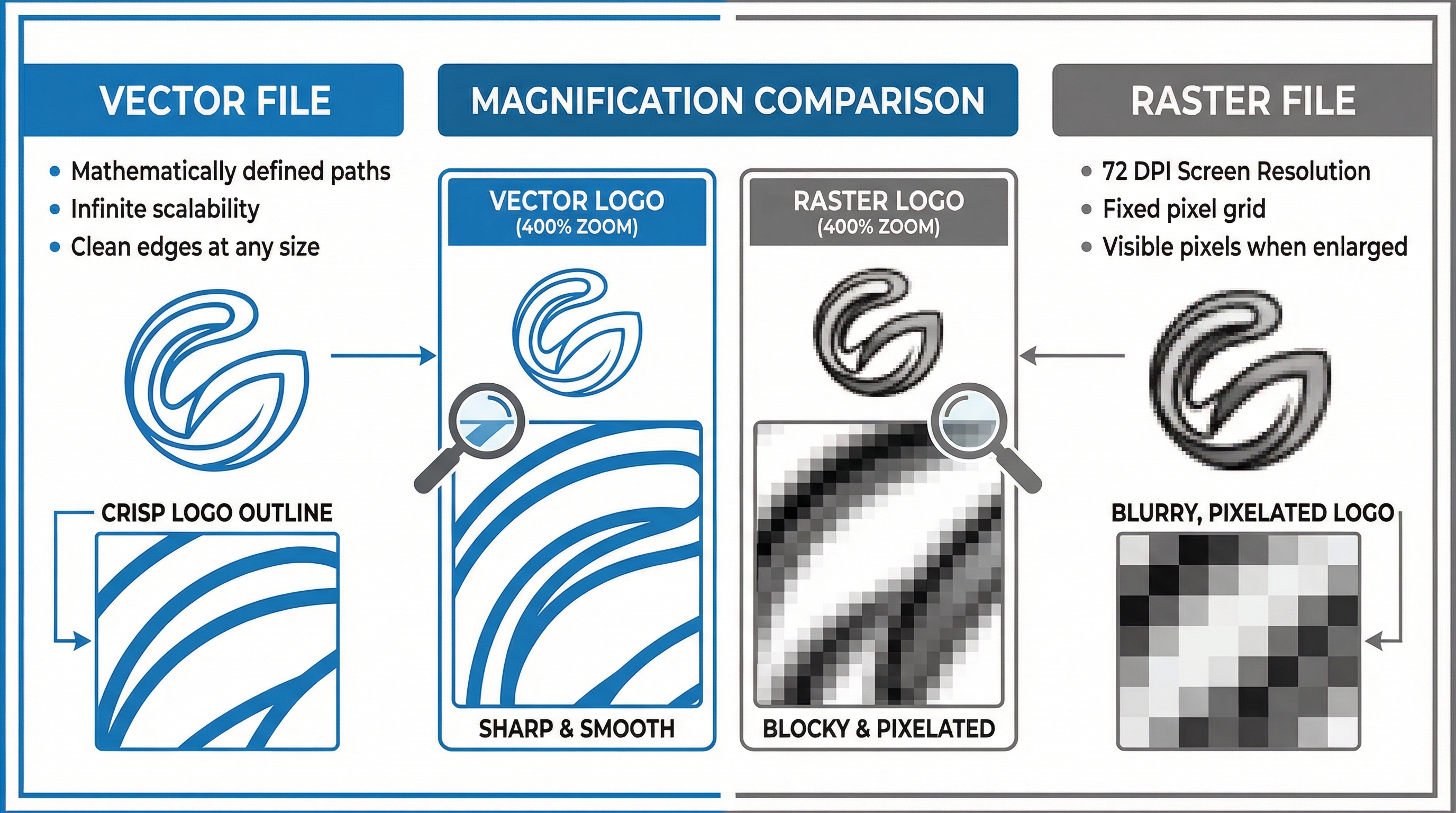
The distinction between vector and raster files represents another layer of this misjudgment. Vector files—typically saved as .AI, .EPS, or .SVG formats—store artwork as mathematical relationships between points and curves. This means they can be scaled to any size without quality degradation. A vector logo can be printed on a business card or a billboard with identical sharpness. Raster files—including .JPG, .PNG, and .TIFF formats—store artwork as a grid of colored pixels. Enlarging a raster image beyond its native resolution produces the pixelation and blurriness that procurement teams dread seeing on finished products.
 Comparison of vector and raster file behavior when scaled for different drinkware decoration sizes
The misjudgment deepens when buyers attempt to convert raster files into vector formats by simply changing the file extension or re-saving through different software. Opening a .JPG file in Adobe Illustrator and saving it as .AI does not transform the underlying pixel grid into scalable vector paths. The file extension changes, but the artwork remains fundamentally raster-based. Production teams encounter this scenario frequently—a file arrives with a .AI extension, suggesting vector format, but contains an embedded raster image that cannot be used for screen printing or laser engraving.
Different decoration methods impose different requirements, and this variability adds another dimension to the misjudgment. Screen printing on stainless steel tumblers requires vector artwork without exception. The printing process involves creating physical stencils from the artwork, and raster files cannot produce the clean edges necessary for stencil creation. Laser engraving similarly demands vector paths because the laser follows precise coordinates to etch the design. Full-color UV printing offers more flexibility, accepting high-resolution raster files at 300 DPI or above, but even this method produces noticeably inferior results when supplied with web-optimized images.
The timeline impact of submitting unsuitable artwork follows a consistent pattern. Day one: the buyer submits what they believe is production-ready artwork. Day two: the prepress team reviews the submission and sends a request for vector files or higher-resolution alternatives. Day three: the buyer, often lacking vector files, either searches for alternatives or requests that the supplier convert the artwork. Days four and five: if conversion is possible, the supplier's design team recreates the artwork as vector paths, a process that involves additional fees and requires buyer approval before proceeding. Only after this cycle completes does the actual production timeline begin.
For buyers managing corporate drinkware programs with fixed event dates, this three-to-five-day delay can compress the production window to the point where rush fees become necessary or delivery dates become uncertain. The irony is that this delay is entirely preventable with proper file preparation before the order is placed.
Understanding what constitutes production-ready artwork requires knowing how to verify file suitability before submission. The zoom test provides a simple diagnostic: open the artwork file and zoom to 400% or higher. If the edges remain smooth and text stays crisp, the file is likely vector-based or sufficiently high-resolution for production. If individual pixels become visible or edges appear jagged, the file will not produce acceptable results on physical products. File size offers another indicator—vector files are typically much smaller than high-resolution raster files because they store mathematical formulas rather than pixel data. A logo file under 100 kilobytes is almost certainly vector; a file of several megabytes is likely raster.
The PDF format deserves special attention because it creates particular confusion. PDF files can contain either vector artwork or embedded raster images, and the file extension provides no indication of which type is inside. A PDF exported from Adobe Illustrator with "Preserve Illustrator Editing Capabilities" enabled contains true vector data. A PDF created by scanning a printed logo or exporting from Microsoft Word contains only raster data regardless of the PDF wrapper. Production teams must open and inspect every PDF submission to determine its actual contents.
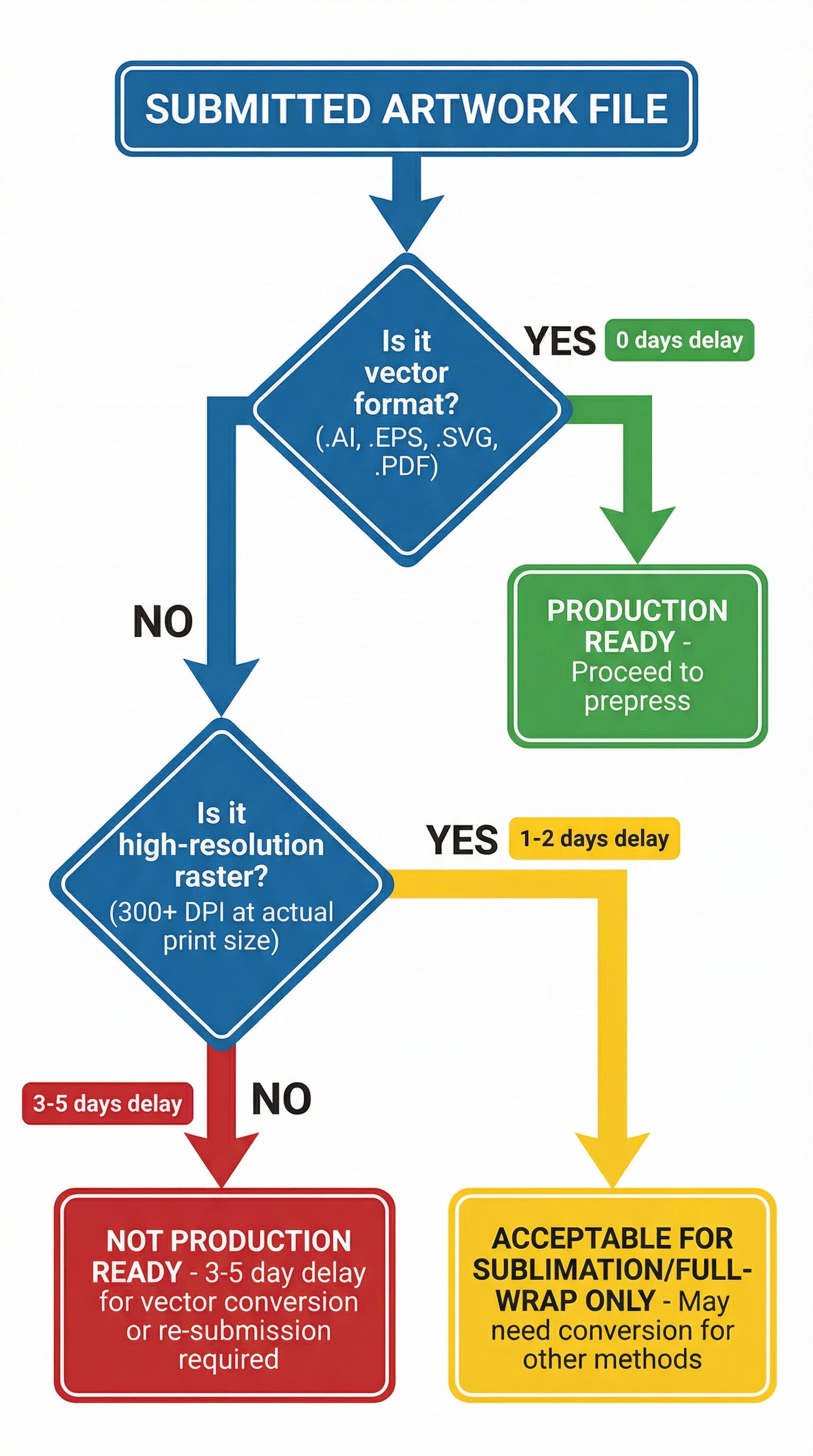 Decision flowchart showing how artwork file format affects production timeline
The practical consequence for procurement professionals is that artwork preparation should occur well before the RFQ stage. Requesting vector files from the original logo designer, verifying file suitability through the zoom test, and confirming which decoration method will be used for the order—these steps prevent the delay cycle entirely. When working with suppliers who understand the full scope of the customization workflow, buyers can often receive artwork guidance during the quotation process rather than discovering file issues after the order is placed.
The screen-versus-production perception gap persists because the visual feedback loop that governs most digital work does not apply to physical manufacturing. A marketing professional who creates presentations, updates websites, and manages social media receives constant visual confirmation that their image files are working correctly. That same professional, when ordering custom tumblers for a corporate event, applies the same visual standard to artwork evaluation—and discovers too late that production requirements operate under entirely different parameters.
For organizations that regularly order custom drinkware, establishing an artwork archive of production-verified files eliminates this misjudgment for future orders. Once a vector logo has been successfully used for tumbler production, that exact file can be reused for subsequent orders without re-verification. The initial investment in obtaining proper vector files pays dividends across every future customization project.
The gap between screen appearance and production readiness is not a technical obscurity—it is one of the most common sources of preventable delay in custom drinkware programs. Recognizing that visual inspection on a computer monitor provides no reliable indication of production suitability is the first step toward eliminating this particular misjudgment from the procurement process.
The decoration method selected for a custom drinkware order determines not only the visual outcome but also the specific artwork requirements that must be met. Screen printing, the most common method for single-color or limited-color logos on stainless steel tumblers, operates through a stencil-based process where ink is pushed through a mesh screen onto the product surface. The stencil itself is created photographically from the submitted artwork, and this process requires vector files with clean, mathematically defined edges. Attempting to create a screen printing stencil from a raster image produces edges that appear fuzzy or stepped, resulting in printed logos that lack the professional crispness that corporate buyers expect.
Laser engraving presents even stricter requirements because the engraving head follows precise coordinate paths programmed from the artwork file. Vector files provide these coordinates directly—the laser moves from point to point along the defined paths, creating clean lines and curves. Raster files contain no path information, only a grid of pixels that must be interpreted by the engraving software. This interpretation process introduces approximations and artifacts that degrade the final engraved result. For high-end corporate gifts where laser-engraved logos represent brand quality, the difference between vector-sourced and raster-sourced engraving is immediately visible to recipients.
Pad printing, commonly used for curved surfaces and smaller imprint areas, shares the stencil-based requirements of screen printing. The artwork must produce clean stencil edges, which means vector files are non-negotiable. Full-wrap printing and sublimation processes offer the most flexibility, accepting high-resolution raster files because these methods transfer continuous-tone images rather than relying on stencil edges. However, even these methods produce superior results when supplied with vector artwork for logo elements and text.
The financial dimension of artwork misjudgment extends beyond the time delay. When suppliers must convert raster artwork to vector format, they charge conversion fees that typically range from $25 to $75 depending on logo complexity. For simple text-based logos, conversion is straightforward. For logos with gradients, fine details, or photographic elements, conversion may be impossible without significant artistic interpretation that changes the logo's appearance. In some cases, suppliers inform buyers that their submitted artwork cannot be converted to production-ready format at all, requiring the buyer to return to their original designer or commission new vector artwork from scratch.
The organizational challenge for procurement teams is that the person placing the drinkware order is rarely the person who created or controls the company's logo files. Marketing departments typically maintain brand assets, but the specific files they use for digital campaigns may not include production-ready vector formats. The original logo designer—whether an internal team member, a freelance designer, or a branding agency—possesses the native vector files, but those files may not have been transferred to the company or may be stored in archives that are difficult to access. This organizational disconnect means that when a procurement professional needs vector artwork for a tumbler order, they may face internal delays in locating the correct files before they can even submit to the supplier.
Establishing a centralized brand asset library that includes production-verified vector files addresses this organizational challenge. The library should contain logo files in multiple formats—native .AI files for maximum flexibility, .EPS files for broad compatibility, .SVG files for web-to-print workflows, and high-resolution .PNG files with transparent backgrounds for situations where raster files are acceptable. Each file should be labeled clearly with its format, color mode, and verified production use. When a procurement team member needs to order custom drinkware, they can pull the appropriate file from the library with confidence that it will pass prepress review.
The color mode distinction adds another layer to artwork preparation that buyers frequently overlook. Digital displays use RGB color mode—red, green, and blue light combined to create colors. Print production typically uses CMYK color mode—cyan, magenta, yellow, and black inks combined to create colors. The color gamut available in RGB is larger than CMYK, meaning some colors that display vibrantly on screen cannot be reproduced exactly in print. Logos designed in RGB mode may shift in hue or saturation when converted to CMYK for production. For brand-critical applications where color accuracy matters, buyers should request that their logo files include CMYK versions or specify Pantone color matches that ensure consistent reproduction across different production methods and suppliers.
The Pantone Matching System deserves particular attention for corporate drinkware programs. Pantone colors are standardized ink formulations that produce consistent results regardless of which supplier or production facility handles the order. When a buyer specifies "Pantone 286 C" for their logo, any supplier with Pantone-capable production equipment can match that exact blue. Without Pantone specification, suppliers interpret color from the submitted file, and variations in monitor calibration, file color profiles, and production equipment can produce noticeably different results. For organizations ordering custom drinkware from multiple suppliers or across multiple orders over time, Pantone specification ensures brand color consistency that RGB or CMYK specifications cannot guarantee.
The cumulative effect of artwork misjudgment on corporate drinkware programs is substantial. A single order delayed by three to five days may seem minor, but when multiplied across dozens of orders annually, the aggregate delay consumes weeks of calendar time that could otherwise be used for production or shipping flexibility. The conversion fees, while individually modest, accumulate into meaningful expense over a multi-year supplier relationship. Most significantly, the stress and uncertainty introduced by artwork issues during time-sensitive orders—conference giveaways, product launches, employee recognition programs—creates friction that undermines the value proposition of custom drinkware as a branding tool.
The solution is not technical sophistication but procedural discipline. Before submitting any custom drinkware order, verify that artwork files are vector format or high-resolution raster at 300 DPI minimum. Confirm which decoration method will be used and whether that method has specific file requirements. Establish an internal process for accessing production-ready brand assets without delay. These steps transform artwork preparation from a reactive problem-solving exercise into a proactive quality assurance process that eliminates one of the most common sources of customization delay.